Changing the Import Path
Depending on the computer configuration, Transaction Manager includes up to two import paths. The local import path defines the directory where manual imports from the accounting package will be stored.
The Cloud Access import path defines the directory where scheduled imports from the accounting package are stored.
By default the local import directory is set to:
C:/Program Files/TrueCommerce/Transaction Manager Online/Import/
You can specify where Transaction Manager should look for an imported file.
To select and set the import path:
-
Select Transaction Manager > Business System on the Foundry Menu to launch the Business System workspace.
-
Select the company name from the business system dropdown to access the associated Business System Company Setup.
-
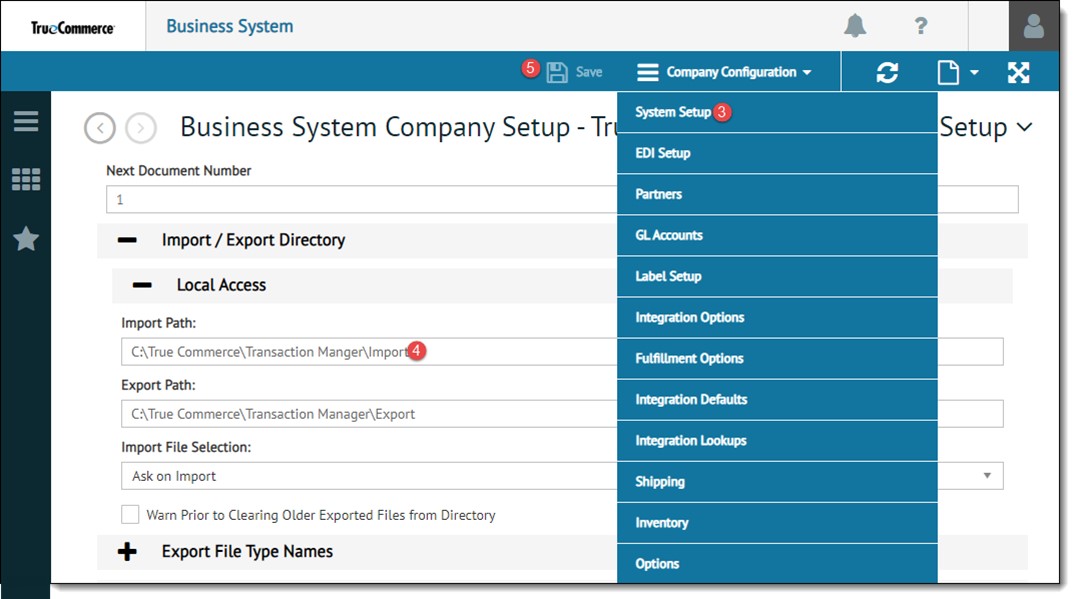
Select System Setup from the Company Configuration dropdown control.
-
Enter your new import path into the Import Path directory field.
-
Click Save on the action bar to save your changes.
Related Topics